
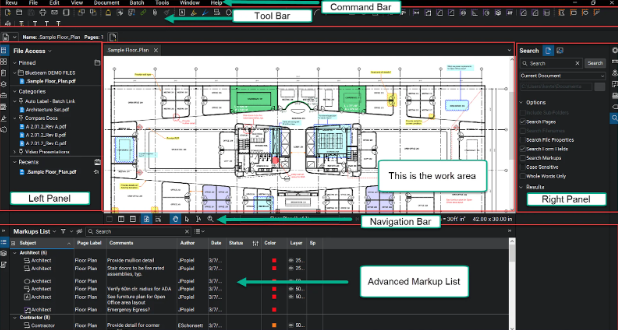
Bluebeam software has transformed the way construction and design professionals manage drawings, communicate in real time, and complete projects faster. With powerful PDF markup tools, cloud collaboration features, and automation capabilities, it boosts productivity across architecture, engineering, and construction workflows. This guide explains everything clearly, using structured, easy-to-read language to deliver a smooth learning experience.
What Is Bluebeam Software
Bluebeam software is a digital solution that helps construction and design teams create, view, edit, measure, and share PDF drawings. It brings all project documents together in one platform, so teams can make decisions faster. Because of its real-time collaboration features, remote workflows become more efficient and more accurate.
Why Bluebeam Software Matters in Construction Projects
In construction, communication delays often lead to rework, wasted material, and increased cost. Bluebeam solves this by offering markup tools that allow instant updates on drawings. Changes become trackable. Teams respond quickly. Workflows speed up, and projects stay aligned from planning to completion.
Key Features of Bluebeam Software
Bluebeam offers features designed to support construction and AEC professionals. It simplifies document management, so teams work smarter. Below are core features that stand out.
1. PDF Creation and Markup Tools in Bluebeam Software
Bluebeam lets users create PDFs from drawings or CAD files. Markup tools allow highlighting, comments, shapes, stamps, and measurement notes. Because everything displays clearly, communication improves. Teams waste less time reviewing prints, and accuracy strengthens with every update.
2. Real-Time Collaboration Using Bluebeam Studio
Bluebeam Studio enables live sessions where multiple users comment and review drawings simultaneously. Instead of long email threads, updates appear instantly. Revision tracking increases accountability. Remote coordination becomes smoother, so project delays reduce significantly.
3. Advanced Measurement Tools for Cost and Quantity Takeoffs
This software includes smart measurement features. Users calculate area, volume, length, and material quantities with precision. Estimators generate cost takeoffs quickly, and contractors prepare bids faster. Visual clarity reduces confusion, so errors don’t interrupt critical planning stages.
4. Document Management and Version Control
Blueprint revisions update constantly during construction. Bluebeam manages versions automatically. Because teams access the latest file only, outdated plans stop creating confusion on-site. Each change remains traceable. Accountability improves and approvals move forward confidently.
5. Automation and Custom Tool Sets
Users save time by automating repetitive tasks, such as stamping or labeling drawings. Custom tool sets store frequently used symbols. Since workflows become repeatable, teams maintain consistency across projects. Work output becomes faster, more uniform, and more professional.
Benefits of Using Bluebeam Software Across AEC Industries
Bluebeam brings many benefits to project teams. It reduces paperwork, boosts accuracy, and speeds up decision cycles. Below are major advantages explained simply for practical understanding.
Increased Productivity and Faster Workflows
Teams complete tasks quicker because tools sit in one place. Combined features remove manual effort and simplify communication. As work speeds up, deadlines become easier to manage. The entire project lifecycle moves more efficiently from day one.
Better Communication and Collaboration
When drawings update, everyone sees changes instantly. Studio sessions reduce miscommunication and long approval cycles. Markups appear clearly, so decisions require less time. Site teams stay aligned with office teams throughout construction.
Reduced Project Cost and Material Waste
Accurate markup and measurement tools lower rework rates. Once errors drop, material planning becomes more efficient. Better decisions save money and resources. Companies gain higher profitability with every project delivered.
Easy Integration with CAD, BIM, and Cloud Platforms
Bluebeam works seamlessly with design and modeling software. Because files transfer smoothly, no data is lost between programs. Integration supports BIM workflows, and document control remains centralized.
Scalability for Small Teams and Enterprise Firms
Bluebeam software supports freelancers, small firms, large contractors, and enterprise-level organizations. Team size does not limit performance. Workflows adapt and grow without disrupting existing operations.
How to Use Bluebeam Software Effectively
Using Bluebeam becomes simple when workflows stay organized. Below are steps that help teams utilize its full potential confidently.
Import and Organize Project Files First
Begin by importing architectural drawings, site plans, and specification documents. Sort them with clear labels and folders. Because a structured library saves time, retrieval becomes easier in later stages of the project.
Create Markups and Share for Review
Use highlight, cloud, text box, and measurement tools to comment on drawings. Share the PDF instantly within Studio. Team members respond directly, so decisions happen faster than traditional file exchange.
Track Revisions and Compare Drawing Versions
Bluebeam’s compare feature highlights changes between two PDFs. Because differences appear visually, errors don’t go unnoticed. Revision control becomes smooth and transparent across all teams.
Export Final Documents and Generate Reports
Once the project finalizes, export updated blueprints, punch lists, and reports. Deliverables remain polished and professional. Documentation becomes cleaner, traceable, and audit-ready.
Future of Bluebeam Software in the Construction Industry
Digital transformation in construction grows rapidly. Bluebeam continues expanding tools for automation, cloud collaboration, and intelligent markup. With greater adoption, job sites move closer to fully paperless workflows. Smart features will continue guiding teams toward efficient building and stronger communication.
Conclusion
Bluebeam software helps construction professionals streamline work, manage drawings effectively, and collaborate without delays. Its measurement tools, annotation features, and real-time cloud connection make projects smooth, accurate, and cost-friendly. If you want efficient workflows and higher productivity, start using Bluebeam today and experience faster project delivery.
FAQs
- What industries use Bluebeam software?
It supports construction, architecture, engineering, and facility management teams working with drawings and digital plans. - Can Bluebeam replace paper blueprints?
Yes, it allows markup, review, and collaboration digitally, reducing the need for printed drawings. - Does Bluebeam support real-time collaboration?
Studio lets multiple users work on the same PDF simultaneously with live updates. - Is Bluebeam suitable for small firms?
It scales easily for freelancers, growing contractors, and enterprise companies. - Does Bluebeam improve accuracy in measuring and estimating?
Advanced takeoff tools enhance precision, reduce errors, and speed up estimating workflows.